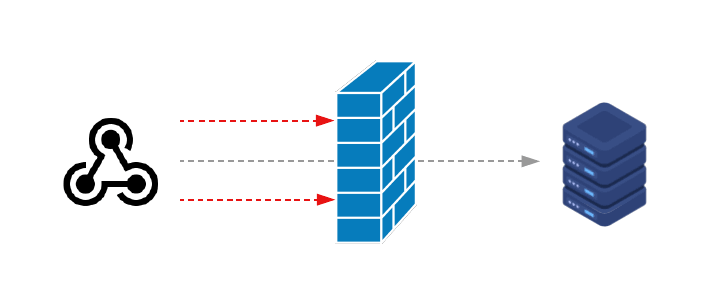
A webhook endpoint that processes Paystack payment events is, functionally, a publicly accessible URL that — when called correctly — triggers your application to record revenue, fulfil an order, upgrade a subscription, or release digital goods.
Read that again. A public URL that triggers financial operations.
The security implication is obvious once you say it out loud. Yet most Nigerian payment integrations are implemented with one or more vulnerabilities that would allow an attacker to trigger those operations without ever making a real payment. The attacker does not need your Paystack secret key. They just need to know your webhook URL and understand your application logic well enough to craft a convincing fake payload.
This guide covers every layer of webhook security — from signature verification to idempotency to infrastructure hardening — with concrete implementation examples for Paystack, Flutterwave, and Monnify. If you have a payment integration in production, read this before you do anything else today.
The Threat Model
Before getting into implementation, it is worth being precise about what you are defending against.
Attack 1: Fake webhook injection An attacker sends a crafted POST request to your webhook URL that looks like a legitimate payment event. If you process it, you fulfil an order without receiving payment.
Attack 2: Replay attacks An attacker captures a legitimate webhook event — perhaps by intercepting it in transit or obtaining a previous event payload — and resends it. If you process it twice, you fulfil an order twice, credit an account twice, or unlock access twice.
Attack 3: Payload tampering An attacker intercepts a legitimate webhook and modifies the amount, customer email, or order reference before it reaches your server. If you do not verify the signature, you process a modified event.
Attack 4: Race condition exploitation An attacker sends multiple concurrent requests for the same event, hoping that your application processes it before your duplicate detection kicks in.
All four attacks are prevented by a combination of signature verification, timestamp validation, idempotency, and proper concurrency handling. None of them require sophisticated tooling on the attacker's side — they require only a basic understanding of HTTP.
Layer 1 — Signature Verification
Every major Nigerian payment gateway signs its webhook payloads. Verifying the signature is the foundational security measure — everything else builds on top of it.
Paystack — HMAC-SHA512
Paystack signs the raw request body using HMAC-SHA512 with your secret key. The signature arrives in the x-paystack-signature header.
import crypto from "crypto";

function verifyPaystackSignature(
  rawBody: string,
  signature: string,
  secretKey: string,
): boolean {
  // Validate signature format before running crypto
  if (!signature || !/^[0-9a-f]+$/i.test(signature)) {
    return false;
  }

  const expected = crypto
    .createHmac("sha512", secretKey)
    .update(rawBody)      // ← raw string, NOT JSON.parse(rawBody)
    .digest("hex");

  // Timing-safe comparison prevents timing attacks
  try {
    return crypto.timingSafeEqual(
      Buffer.from(expected, "hex"),
      Buffer.from(signature, "hex"),
    );
  } catch {
    // Buffers of different lengths throw — signature is invalid
    return false;
  }
}
Two critical details in this implementation:
Raw body, not parsed JSON. If you parse the body with JSON.parse and then stringify it again before computing the hash, you will get a different hash than Paystack computed. JSON serialisation is not deterministic — key ordering, whitespace, and number formatting can all differ between implementations. Read the body as a raw string with req.text() and pass that string directly to the HMAC function.
Timing-safe comparison. A naive string comparison (expected === signature) is vulnerable to timing attacks where an attacker can infer how many characters of their guess are correct by measuring response time differences. crypto.timingSafeEqual takes constant time regardless of where the strings diverge.
Flutterwave — Secret Hash Comparison
Flutterwave uses a different approach. Instead of HMAC, they send your webhook secret verbatim in the verif-hash header. You compare this header value against your configured secret.
function verifyFlutterwaveSignature(
  secretHash: string | null,
  expectedSecret: string,
): boolean {
  if (!secretHash) return false;

  // Still use timingSafeEqual even for plain comparison
  try {
    return crypto.timingSafeEqual(
      Buffer.from(secretHash.trim()),
      Buffer.from(expectedSecret.trim()),
    );
  } catch {
    return false;
  }
}
Flutterwave's approach is simpler but weaker — it does not cryptographically bind the signature to the payload content. An attacker who knows your verif-hash value (perhaps from a source code leak or a compromised environment variable) can craft any payload and it will pass verification. With Paystack's HMAC approach, knowing the signature for one payload tells you nothing about the signature for a different payload.
This means Flutterwave integrations need to be especially careful about protecting the secret hash value and verifying payload content independently.
Monnify — HMAC-SHA512 with Different Header
Monnify uses HMAC-SHA512 like Paystack but sends the signature in a different header (monnify-signature) and may use a different field from your API credentials as the signing key.
function verifyMonnifySignature(
  rawBody: string,
  signature: string | null,
  apiKey: string,
): boolean {
  if (!signature || !/^[0-9a-f]+$/i.test(signature)) {
    return false;
  }

  const expected = crypto
    .createHmac("sha512", apiKey)
    .update(rawBody)
    .digest("hex");

  try {
    return crypto.timingSafeEqual(
      Buffer.from(expected, "hex"),
      Buffer.from(signature, "hex"),
    );
  } catch {
    return false;
  }
}
Verify which credential Monnify uses as the signing key in their current documentation — this has changed between API versions.
What to Return on Signature Failure
This is where many implementations make a mistake. When signature verification fails, they return 401 Unauthorized or 403 Forbidden. This is the wrong response for two reasons:
First, it tells an attacker that their payload structure was correct but their signature was wrong — useful information for refining an attack.
Second, it causes the payment gateway to retry the event. When Paystack receives a non-200 response, it assumes delivery failed and will retry with increasing delays. An attacker who sends enough fake events can trigger retry storms that consume your server capacity.
The correct response to a failed signature is 200 OK with a body indicating the event was received but not processed:
if (!isValid) {
  // Do not reveal WHY we rejected — just acknowledge receipt
  return res.status(200).json({ received: false });
}
Return 503 Service Unavailable only for genuine infrastructure failures — database down, queue unavailable — where you actually want the gateway to retry.
Layer 2 — Read the Body Before Anything Else
A webhook handler should read the raw request body as its very first action, before any middleware touches it.
The common mistake is letting an Express or Next.js JSON body parser run before your webhook handler. Body parsers parse JSON and discard the original string. By the time your handler runs, the raw body is gone — you cannot compute the HMAC because you no longer have the exact bytes that were signed.
// WRONG — JSON middleware runs first, raw body is gone
app.use(express.json());
app.post("/webhook/paystack", (req, res) => {
  const rawBody = ???; // too late — it's been parsed
});

// CORRECT — read raw body in the handler
app.post(
  "/webhook/paystack",
  express.raw({ type: "application/json" }),  // ← raw, not json
  (req, res) => {
    const rawBody = req.body.toString("utf8");
    const signature = req.headers["x-paystack-signature"] as string;
    // Now you can verify
  },
);
In Next.js App Router, req.text() gives you the raw body directly:
export async function POST(req: NextRequest) {
  const rawBody = await req.text();  // ← always call this first
  const signature = req.headers.get("x-paystack-signature") ?? "";
  // Verify before parsing
  const body = JSON.parse(rawBody);
}
Also validate the body size before reading it. A webhook payload is never legitimately 50MB. Set an upper bound and reject oversized requests before you read them:
const rawBody = await req.text();

if (rawBody.length > 2 * 1024 * 1024) { // 2MB limit
  return NextResponse.json({ error: "Payload too large" }, { status: 413 });
}
Layer 3 — Replay Attack Prevention
Signature verification alone does not prevent replay attacks. A legitimate webhook event has a valid signature — if an attacker captures it and resends it, the signature is still valid.
Timestamp Validation
Paystack and some gateways include a timestamp in the payload. Reject events with timestamps more than five minutes in the past:
const eventTimestamp = new Date(body.data?.paid_at ?? body.data?.created_at);
const now = new Date();
const ageMs = now.getTime() - eventTimestamp.getTime();

const FIVE_MINUTES_MS = 5 * 60 * 1000;

if (ageMs > FIVE_MINUTES_MS) {
  console.warn(`[webhook] Stale event rejected: ${ageMs}ms old`);
  return NextResponse.json({ received: true, status: "ignored" }, { status: 200 });
}
This window needs to account for legitimate delays — a webhook from Paystack may take 30–60 seconds to arrive during high traffic. Five minutes is a reasonable window that blocks replay attacks while allowing legitimate delayed deliveries.
Idempotency — The More Robust Defence
Timestamp validation has a gap: it does not prevent an attacker from replaying an event within the five-minute window. The more robust defence is idempotency — ensuring that processing the same event twice produces the same result as processing it once.
For payment webhooks, idempotency means storing the transaction reference and rejecting any duplicate:
// Check before processing
const existing = await transactionsRepository.findByReference(
  bridgeId,
  body.data.reference,
);

if (existing) {
  console.log(`[webhook] Duplicate reference ${body.data.reference} — ignored`);
  return NextResponse.json(
    { received: true, status: "ignored" },
    { status: 200 },
  );
}

// Process and store atomically
const transaction = await transactionsRepository.create({
  reference: body.data.reference,
  // ...
});
The reference field is your idempotency key. Every payment event from every Nigerian gateway includes a unique reference. If you have already processed a reference, you do not process it again — full stop.
We use a partial unique index in PostgreSQL to enforce this at the database level as a backstop:
CREATE UNIQUE INDEX unq_bridge_reference_success
ON transactions (bridge_id, reference)
WHERE status = 'success';
Even if your application-level duplicate check has a race condition, the database constraint will reject the second insert with a conflict error rather than creating a duplicate record.
Layer 4 — Handling Race Conditions
Race conditions on webhook endpoints are more common than developers expect. Paystack sometimes sends the same event multiple times in rapid succession — particularly if your initial response was slow and their timeout fired before you returned 200. The result is two near-simultaneous requests for the same event reaching your server.
With only an application-level duplicate check, both requests can pass the check (before either has written to the database) and both attempt to create the transaction record. One succeeds. The other either fails silently or creates a duplicate.
The correct defence is a combination of the database-level unique constraint above plus careful error handling:
try {
  const transaction = await transactionsRepository.create({
    reference: body.data.reference,
    // ...
  });

  if (!transaction) {
    // onConflictDoNothing returned null — duplicate was blocked at DB level
    return NextResponse.json(
      { received: true, status: "ignored" },
      { status: 200 },
    );
  }

  // Continue processing
} catch (err: any) {
  // Unique constraint violation — another request beat us to it
  if (err?.code === "23505") { // PostgreSQL unique violation
    return NextResponse.json(
      { received: true, status: "ignored" },
      { status: 200 },
    );
  }
  throw err; // Re-throw genuine errors
}
The 23505 error code is PostgreSQL's unique constraint violation. Catching it explicitly means a race condition produces an ignored duplicate rather than an unhandled error.
Layer 5 — Rate Limiting
A public webhook URL without rate limiting is an invitation for denial-of-service attacks. An attacker who discovers your webhook URL can send thousands of requests per second, consuming server resources even if every request fails signature verification.
Rate limiting per webhook slug (or per IP) prevents this:
import { checkRateLimit } from "@/lib/rate-limiter";

// Before reading the body or verifying the signature
const rateResult = await checkRateLimit(
  `webhook:${slug}`,
  10_000,          // 10k events per day per bridge
  60 * 60 * 24,    // 24-hour window
);

if (!rateResult.allowed) {
  return NextResponse.json(
    { received: false, error: "Rate limit exceeded" },
    {
      status: 429,
      headers: {
        "Retry-After": String(
          Math.ceil((rateResult.resetAt.getTime() - Date.now()) / 1000),
        ),
      },
    },
  );
}
10,000 events per day is generous for any legitimate bridge — most merchants see fewer than 1,000 webhook events per day even at significant volume. If you are regularly approaching this limit, increase it; the default should be high enough to never affect legitimate traffic.
Rate limit by slug rather than by IP because payment gateways often use multiple IP addresses for webhook delivery and those IPs change over time. Rate limiting by gateway IP would require maintaining an allowlist that goes stale.
Layer 6 — Only Accept Expected Event Types
Your webhook handler should explicitly check that it recognises the event type before doing anything with the payload:
const HANDLED_PAYSTACK_EVENTS = new Set([
  "charge.success",
  "charge.dispute.create",
  "transfer.reversed",
  "subscription.create",
  "subscription.charge.success",
  "subscription.not_renew",
  "subscription.disable",
]);

const eventType = body.event as string;

if (!HANDLED_PAYSTACK_EVENTS.has(eventType)) {
  // Acknowledge but do not process unknown event types
  return NextResponse.json(
    { received: true, status: "ignored", reason: "Unhandled event type" },
    { status: 200 },
  );
}
Returning 200 for unrecognised events prevents Paystack from retrying them indefinitely. Explicitly checking the allowlist rather than using a switch-default pattern means a new event type Paystack adds in the future does not accidentally fall through to some processing logic.
Layer 7 — Sanitise What You Store
Webhook payloads can contain sensitive data that you should not store verbatim. Paystack's charge.success payload includes:
authorization.authorization_code— can be used for future charges on the cardauthorization.last4— partial card numberauthorization.bin— card BIN, useful for fraud analysis but also sensitivecustomer.ip_address— customer's IP at time of paymentlog— a full array of the customer's actions during the checkout session
Storing raw webhook payloads in your database is a PCI-DSS concern. If your database is compromised, attackers have access to authorization codes that can be used to charge your customers' cards again.
Sanitise the payload before storing it in your webhook logs:
function sanitizeWebhookPayload(payload: Record<string, any>): Record<string, any> {
  const sanitized = { ...payload };

  if (sanitized.data?.authorization) {
    // Remove the reusable authorization code
    delete sanitized.data.authorization.authorization_code;
    // Keep last4 and bin for reference but mask them if extra caution needed
  }

  if (sanitized.data?.customer) {
    // Remove IP address — NDPA PII
    delete sanitized.data.customer.ip_address;
  }

  // Remove the full action log — large and unnecessary
  if (sanitized.data?.log) {
    sanitized.data.log = `[${sanitized.data.log.length} entries — redacted]`;
  }

  return sanitized;
}
Store the sanitised version in your webhook_logs table. The original payload should never touch your database.
Layer 8 — HTTPS Everywhere, Always
Your webhook endpoint must be served over HTTPS. HTTP webhook endpoints are vulnerable to man-in-the-middle attacks where an attacker intercepts the payload in transit, modifies it, and forwards it to your server. If you do not also verify the signature, you will process the tampered payload.
Vercel, Railway, Render, and all modern deployment platforms provide HTTPS by default on their subdomains. If you use a custom domain, confirm that your TLS certificate is valid and that HTTP requests are redirected to HTTPS (not just available on HTTPS).
Do not accept webhook events on HTTP endpoints, even in development. Use a tunnelling tool like ngrok or cloudflared to expose your local development server over HTTPS:
# ngrok — creates a temporary HTTPS URL pointing to your local server
ngrok http 3000

# cloudflared — similar, from Cloudflare
cloudflare tunnel --url http://localhost:3000
Register the HTTPS URL ngrok or cloudflared provides in your Paystack test dashboard. This gives you a realistic test environment where signature verification actually works the same way it will in production.
Putting It Together — A Complete Webhook Handler
Here is a complete, production-grade webhook handler for Paystack that implements every layer discussed above:
// app/api/webhook/[slug]/route.ts
import { type NextRequest, NextResponse } from "next/server";
import crypto from "crypto";
import { checkRateLimit }        from "@/lib/rate-limiter";
import { transactionService }    from "@repo/core";
import { bridgesRepository }     from "@repo/db";

export const runtime = "nodejs"; // crypto.createHmac requires Node.js

const HANDLED_EVENTS = new Set([
  "charge.success",
  "charge.dispute.create",
  "transfer.reversed",
]);

export async function POST(
  req: NextRequest,
  { params }: { params: Promise<{ slug: string }> },
) {
  const { slug } = await params;

  // Layer 5 — Rate limiting (before reading body)
  const rateResult = await checkRateLimit(`webhook:${slug}`, 10_000, 86400);
  if (!rateResult.allowed) {
    return NextResponse.json(
      { received: false },
      { status: 429, headers: { "Retry-After": "3600" } },
    );
  }

  // Layer 2 — Read raw body first, before any parsing
  const rawBody = await req.text();

  // Size guard
  if (rawBody.length > 2 * 1024 * 1024) {
    return NextResponse.json({ error: "Payload too large" }, { status: 413 });
  }

  // Extract only known signature headers
  const signature = req.headers.get("x-paystack-signature") ?? "";

  // Layer 1 — Signature verification
  const bridge = await bridgesRepository.findBySlug(slug);
  if (!bridge) {
    // Return 200 — do not reveal that the slug does not exist
    return NextResponse.json({ received: false }, { status: 200 });
  }

  const secretKey = decryptProviderSecret(bridge.providerSecretEncrypted);
  const isValid   = verifyPaystackSignature(rawBody, signature, secretKey);

  if (!isValid) {
    // Layer 1 — Return 200 on invalid signature to prevent retry storms
    console.warn(`[webhook] Invalid signature for slug: ${slug}`);
    return NextResponse.json({ received: false }, { status: 200 });
  }

  // Parse only after verification
  const body = JSON.parse(rawBody) as Record<string, any>;

  // Layer 6 — Event type allowlist
  if (!HANDLED_EVENTS.has(body.event)) {
    return NextResponse.json(
      { received: true, status: "ignored" },
      { status: 200 },
    );
  }

  // Return 200 immediately — processing happens asynchronously
  // This prevents gateway timeouts from causing retries
  const response = NextResponse.json(
    { received: true, status: "queued" },
    { status: 200 },
  );

  // Layer 3 & 4 — Idempotency and race condition handling
  // are enforced inside transactionService.handleIncomingWebhook
  // via the database-level unique constraint
  try {
    await transactionService.handleIncomingWebhook(slug, rawBody, {
      "x-paystack-signature": signature,
    });
  } catch (err) {
    // Log but do not change the response — we already returned 200
    console.error(`[webhook] Processing error for slug ${slug}:`, err);
  }

  return response;
}

function verifyPaystackSignature(
  rawBody: string,
  signature: string,
  secretKey: string,
): boolean {
  if (!signature || !/^[0-9a-f]+$/i.test(signature)) return false;

  const expected = crypto
    .createHmac("sha512", secretKey)
    .update(rawBody)
    .digest("hex");

  try {
    return crypto.timingSafeEqual(
      Buffer.from(expected, "hex"),
      Buffer.from(signature, "hex"),
    );
  } catch {
    return false;
  }
}
Common Vulnerabilities in Nigerian Payment Integrations
To close, here is a list of the specific vulnerabilities we most commonly see when reviewing Nigerian payment integrations. Check your own implementation against each one.
Verifying the signature on a parsed body. As described above — JSON.stringify(JSON.parse(rawBody)) does not reproduce the original bytes. The HMAC will not match even for legitimate events, causing you to either reject all events or (worse) skip verification entirely when you see it failing.
Returning 401 or 403 on signature failure. Causes the gateway to retry. An attacker who triggers enough of these can exhaust your server with retry traffic.
Checking only the event type, not the status field. charge.success events can have a status field of failed or abandoned inside the payload. Always check data.status === "success" in addition to event === "charge.success".
Trusting the amount in the webhook payload without verification. For critical operations — unlocking high-value digital goods, topping up balances — verify the amount against what you expected from the specific order. Do not fulfil a ₦100,000 order because a webhook claims a ₦100 payment was made with event: "charge.success".
Storing raw payloads including authorization codes. As described in Layer 7 — sanitise before storing.
Running verification in a middleware that only fires on some routes. If your signature verification middleware has exceptions or can be bypassed, those exceptions are your vulnerabilities.
Using a test secret key in production. Test and live keys are different. A test key will successfully verify test-mode webhooks but not live-mode webhooks — and vice versa. Confirm your environment variables contain the correct key for each environment.
No monitoring on webhook delivery rate. If your Paystack dashboard shows 95% of webhooks failing, you have a problem — but you will only know if you are monitoring. Set up alerts on your webhook endpoint's error rate.
The security posture of your webhook endpoint is a direct reflection of the security posture of your business finances. An insecure endpoint is not a theoretical risk — it is an open door to anyone who wants to trigger your order fulfilment system without paying. Closing that door takes an afternoon. Dealing with the consequences of leaving it open can take much longer.
KoboSync implements all eight security layers described in this guide on every webhook endpoint it creates — HMAC verification, timing-safe comparison, idempotency via database constraints, rate limiting, payload sanitisation, and more. Every bridge you connect is secure by default. See how it works →